Scaling (ECS)
Cloud service provider relevance: ECS
Large-scale compute clusters are costly, so maximizing their utilization is essential. You can increase utilization and efficiency by running a mix of workloads on the same machines: CPU- and memory-intensive jobs, small and large ones, and a mix of offline and low-latency jobs – ones that serve end-user requests or provide infrastructure services such as storage, naming, or locking.
The Challenge of Scaling Containers
The ECS topology is built on clusters, where each cluster has services (applications), and services run tasks. Each task has a task definition which tells the scheduler how many resources the task requires.
For example, if a cluster runs 10 machines of c3.large (2 vCPUs and 3.8 GiB of RAM) and 10 machines of c4.xlarge (4 vCPUs and 7.5 GiB of RAM), the total vCPUs is 60*1024 = 61,440 CPU Units and the total RAM is 113 GiB.
If a single task requires more RAM than the individual instance has, it cannot be scheduled. In the example above, a task with 16 GiB of RAM will not start, despite the total available RAM being 113 GiB. Ocean matches the task with the appropriate instance type and size while requiring zero overhead or management.
Ocean dynamically scales the cluster up and down to ensure sufficient resources are always available to run all tasks while maximizing resource allocation. It achieves this through Tetris Scaling, which optimizes task placement across the cluster, and by automatically managing headroom—a buffer of spare capacity (memory and CPU) that enables rapid container scaling without waiting for new instances to be provisioned.
Scale Up Behavior
Ocean keeps track of tasks that cannot be scheduled and employs the following process for scaling up.
-
Ocean continuously looks for underprovisioned ECS services, i.e., services for which the count of running tasks is lower than the required task count.
-
For those services, Ocean simulates placement of the required tasks on the cluster's current container instances, including instances that were just launched and not yet registered as container instances (for example, according to previous scale up activity).
-
If the simulation results in no container instances that are able to host all pending tasks, Ocean will scale up for the remaining tasks. During the scale up, Ocean uses its launch specifications to consider all placement constraints.
When the process is completed, all tasks are scheduled and running. Ocean continues to monitor for underprovisioned ECS services, as described in Step 1 above, and will initiate additional scale up if it becomes necessary.
Headroom
Ocean provides the option to include a buffer of spare capacity (vCPU and memory resources) known as headroom. Headroom ensures that the cluster has the capacity to quickly scale more tasks without waiting for new container instances to be provisioned. The headroom capacity is kept across the cluster and as separate units in order to support scheduling of new pods.
You can configure headroom in specific amounts of vCPU and memory or specify headroom as a percentage of the total CPU and memory.
Ocean optimally manages the headroom to provide the best possible cost/performance balance. However, headroom may also be manually configured to support any use case.
Placement Constraints
Ocean supports built-in and custom task placement constraints within the scaling logic. Task placement constraints give you the ability to control where tasks are scheduled, such as in a specific availability zone or on instances of a specific type. You can utilize the built-in ECS container attributes or create your own custom key-value attribute and add a constraint to place your tasks based on the desired attribute.
Ocean provides a custom placement restraint which enables you to control how specific tasks are scheduled. For example, if you have mission-critical tasks that cannot run on spot instances, you can use the placement restraint spotinst.io/container-instance-lifecycle to schedule tasks only on on-demand instances.
This is the format of the placement restraint:
"attribute:spotinst.io/container-instance-lifecycle==od"

To use this feature:
- Add
ecs:putAttributespermissions to your AWS IAM role (see Spot Policy for AWS). As soon as Spot sees pending tasks that ask for this placement constraint, autoscaler will scale up an on-demand instance and use theecs:putAttributespermissions to add this attribute to the on-demand instance spun up by the auto scaler. - Contact the Spot support team via chat or email, and request to enable the ECS lifecycle support per service. Once enabled, the label above will take effect.
Scale Up According to Available IPs
When the Ocean autoscaler needs to scale up an instance, it selects the Availability Zone and the included subnet with the most available IPv4 addresses. This avoids IP address exhaustion in a specific subnet and prevents scaling up a node in a subnet that does not have enough IP addresses. If all the subnets set for a virtual node group run out of available IP addresses, scaling up is blocked, and the Spot Monitoring team will email you to request that you add more subnets to the virtual node group.
Scaling Block Mechanism
Since tasks are created only after the proper infrastructure exists (Ocean scales for an underprovisioned ECS service), there is a potential for infinite scaling to occur. This could happen, for example, if there is a task that keeps failing and the service continues to be underprovisioned.
To prevent infinite scaling, Ocean will stop scaling for an underprovisioned service after 120 minutes as long as no changes were made to the service. If such a stop occurs, you should update the service to let Ocean scale again.
Scale Down Behavior
Ocean monitors the cluster and runs bin-packing algorithms that simulate different permutations of task placement across the available container instances. A container instance is considered for scale down when:
- All the running tasks on the particular instance can be scheduled on other instances.
- The instance's removal will not reduce the headroom below the target.
Ocean will prefer to downscale the least utilized instances first.
When an instance is selected for scale-down, Ocean drains it by rescheduling its running tasks to other instances before terminating the instance.
Usage Notes
- Ensure that permission for
ecs:stopTaskis included in your Spot policy. ThestopTaskaction is required for the drain process and used to stop tasks that are still not drained after the draining timeout has passed. - Scale-down actions are limited by default to 10% of the cluster size at a time. This parameter is configurable.
Scale Down Prevention
You can mark a resource so that it will not be scaled down. Use the spotinst.io/restrict-scale-down tag to prevent the scale down of a task or service.
Example of a tag added to the task definition or the service:
{
  "tags": [
    {
      "key": "spotinst.io/restrict-scale-down",
      "value": "true"
    }
  ]
}
When you add a new tag in a task definition, you must create a new revision. Otherwise, the new tag will not be visible.
For more information about tagging in ECS, see Tagging Your Amazon EC2 Resources.
Daemon Tasks
Daemon tasks run on each instance or on a selected set of instances in an Amazon ECS cluster and can be used to provide common functionality, such as logging and monitoring. Ocean automatically identifies and accounts for Daemon tasks when optimizing capacity allocation to make sure the launched instances have enough capacity for both the daemon services and the pending tasks. It also monitors for new container instances in the cluster and adds the Daemon tasks to them. Ocean supports and considers Daemon services and tasks, both for scale down and scale up behavior.
Scale down: A Daemon task that was part of a scaled-down instance will not:
- Initialize a launch of a new instance.
- Be placed on a different container instance.
Scale up: If there is a Daemon scheduling strategy configured for one of the cluster services, Ocean will consider all newly launched instances to have enough spare capacity available to run the Daemon task properly in addition to other pending tasks.
Customizing Scaling Configuration
Ocean manages the cluster capacity to ensure all tasks are running, and that resources are utilized. If you want to override the default configuration, you can customize the scaling configuration.
To customize the scaling configuration:
- Navigate to your Ocean cluster.
- Click Actions on the top right side of the screen to open the Actions menu.
- Click Customize Scaling.
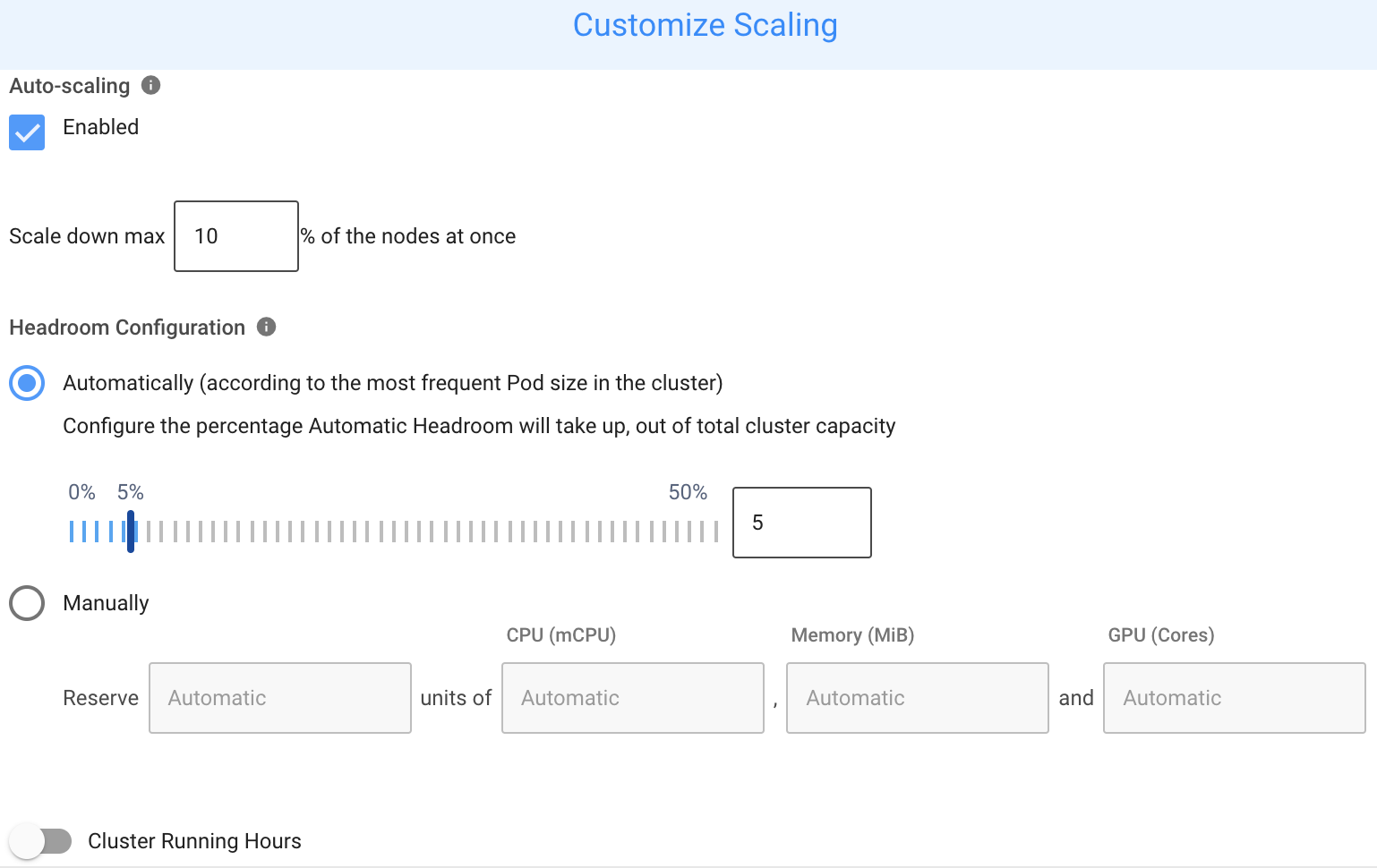
Auto-scaling should remain enabled during normal operation. When disabled, Ocean cannot scale up or down or maintain headroom. Additionally, the Cluster Shutdown Hours feature will not function correctly when scaling the cluster back to its required state.
Supported Operating Systems
Ocean supports launching of instances using any ECS supported operating system (OS), including container-optimized OSs such as Bottlerocket OS.
Windows and Linux Instances in the same Cluster
Ocean supports using different operating systems within an ECS cluster. Using the virtual node group (VNG) concept, you can have Ocean manage Windows instances alongside other instances in the cluster.
To enable this, create a virtual node group with a Windows AMI. For Windows workloads, the autoscaler automatically launches instances only from dedicated virtual node groups. You do not need to set any specific label on the virtual node group unless you have multiple virtual node groups and want to ensure the workload runs on a specific one.